phoboslab

UVC Camera Control for Mac OS X

For a recent computer vision project I needed to pull images out of a Logitech QuickCam 9000 and track some markers with the help of the ARToolKitPlus library. I connected the camera to my Mac and was quite surprised to see that it just works. There was no need to install any drivers. As I learned later, that's because the QuickCam 9000 is a UVC webcam for which Mac OS X 10.4.9 already provides a driver. I was able to get to the raw camera images through the QTKit Framework in no time.

However, the QuickCam 9000 has its auto exposure enabled by default, which is absolutely deadly for stable tracking results. I thought I could just turn the auto exposure off and set it to a fixed value through some QTKit API – but no, there's no way to change the exposure of a UVC camera with QTKit. In fact, there's no way to change any parameters of your camera. No exposure values, no white balance, no gain, nothing. Apple just implemented the bare minimum in its UVC driver and the QTkit Framework.

Well, maybe I could get to these parameters through the older Sequence Grabber Framework then? After all, there's a VDIIDCSetFeatures function and a vdIIDCFeatureExposure key! But nope, as the name implies, this stuff only works for IIDC cameras. What's an IIDC camera? Wil Shipley asked the same questions almost 3 years ago - even back then, IIDC cameras were pretty much deprecated. Still, these cameras are the only devices that Apple provides an API for, if you want to change some esoteric parameters no one would ever need to change, like oh, the exposure time or white balance temperature for instance.

Apple is aware of the problem but hasn't done anything to solve it. And Logitech apparently doesn't see the need to provide a Mac driver for their cameras, since Mac OS X already ships with one. Great.

But wait, UVC is a standard, right? USB.org provides a documentation for all device classes, and the Video Class is no exception. So, I poked around in the documentation for a while, read some Linux UVC driver sourcecode and used Apple's USB Prober to see what's going on. After some more hours of playing around with the Kernel Framework's USB API, I was finally able to control some of the QuickCam's settings!

UVCCameraControl class

I've now cleaned up the source a bit and organized everything in a UVCCameraControl class. You can use it like this:

UVCCameraControl * cameraControl = [[UVCCameraControl alloc] 
    initWithVendorID:0x046d productID:0x0990];

[cameraControl setAutoExposure:NO];
[cameraControl setExposure:0.9];

[cameraControl release];

All the input values are normalized. Before setting a value the UVCCameraControl class asks the device for the min and max value for that setting and maps the input value accordingly. So exposure, gain, brightness, contrast, saturation, sharpness and white balance all accept values from 0.0 to 1.0.

In this example, VendorID and ProductID are the ones of the Logitech QuickCam 9000. You can use the USB Prober to find the values of your camera. In theory, the UVCCameraControl class should work with all UVC compatible cameras. However, I wasn't able to control the built-in iSight of my MacBook Air at all and I don't have any other cameras to test this with. So all I know at this moment, is that it works with the QuickCam. I've also only implemented those controls that are supported by the QuickCam – other cameras might not support all of these, or might support additional ones.

Note that you only have access to the camera if it is not in use by another process. This means you can't change the camera's settings while using it in iChat or other applications. My understanding is that if you'd want to do that, you'd have to write a Kernel Extension. The UVCCameraControl class is only useful for you, if you use the camera in your own application. So if you're doing blob tracking or marker detection or any other computer vision stuff, this probably is what you're looking for.
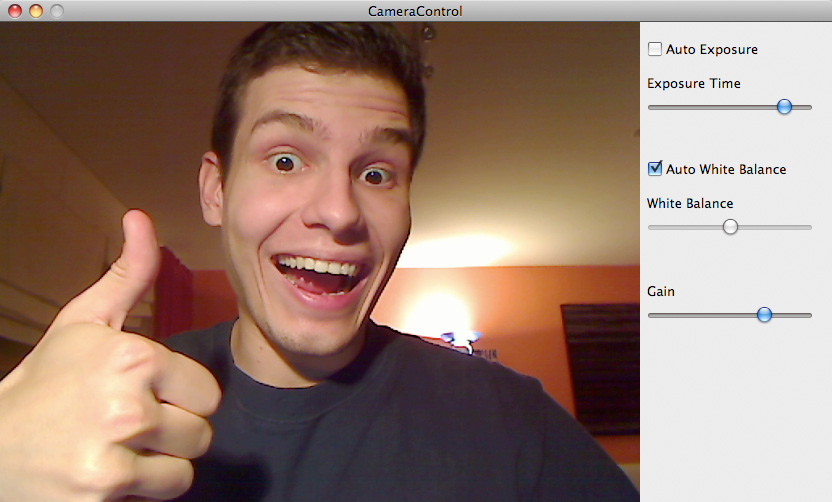
UVC Camera Control I also built a simple demo application that makes use of the UVCCameraControl class. This demo uses QTKit to open a connection to the first (default) video device and simply displays the images in a QTCaptureView. There's no system setting to select the default video device, however the device you selected to use in iChat will be the default (you have to quit iChat after selecting your camera, otherwise it will be locked for all other applications).

The controls currently supported by the UVCCameraControl class are:

- (BOOL)setAutoExposure:(BOOL)enabled;
- (BOOL)getAutoExposure;
- (BOOL)setExposure:(float)value;
- (float)getExposure;
- (BOOL)setGain:(float)value;
- (float)getGain;
- (BOOL)setBrightness:(float)value;
- (float)getBrightness;
- (BOOL)setContrast:(float)value;
- (float)getContrast;
- (BOOL)setSaturation:(float)value;
- (float)getSaturation;
- (BOOL)setSharpness:(float)value;
- (float)getSharpness;
- (BOOL)setAutoWhiteBalance:(BOOL)enabled;
- (BOOL)getAutoWhiteBalance;
- (BOOL)setWhiteBalance:(float)value;
- (float)getWhiteBalance;

Download

Consider this as public domain. Do whatever you want with it. I'm not responsible if your camera explodes or for any other damages this software might cause!

Wednesday, July 15th 2009
Tags: Objective-C, OS X

52 Comments:

#1: Colby Gutierrez-Kraybill – Wednesday, September 9th 2009, 05:51

Brilliant! I'm very happy you've gone about doing this. Now I shall make time to add in pan-tilt-zoom.

#2: Nick Forge – Monday, October 12th 2009, 05:30

Thanks for making this code public! I worked on a Computer Vision project last year where we spent a long time trying to do exactly what you've described.

Just out of interest: have you tested this on Snow Leopard (10.6)?

#3: Nick Forge – Monday, October 12th 2009, 05:39

Also, just a quick note on Objective-C/Cocoa conventions - 'getters' in Objective-C are written without the 'get'. In other words, 'getAutoExposure' should probably be 'autoExposure'. If you adhere to the standard naming conventions you can make use of other higher-level Cocoa features like KVC, KVO and Bindings.

#4: Grant – Monday, October 12th 2009, 22:00

So iChat will recognize my logitech pro 9000, but even after following your instructions the app goes straight to my built in iSight. Any ideas on how to get around this? Thanks!

#5: Dominic – Thursday, October 15th 2009, 08:13

@Nick: I did only test this on 10.5. Haven't installed 10.6 on my machine yet.

Thanks for the info about the getter methods; I'm still quite new to Objective-C. I also just noticed that my setter methods should be of type void (they currently return a boolean). Will fix that sometime :)

@Grant: Have you tried using the alternative constructor, like it's described in the source (CameraControlAppDelegate.m)?
- (id)initWithVendorID:(long) productID:(long)

The sad thing is, I couldn't find a reliable way to get the USB location id of the camera from the QTCaptureDevice object, or vice versa. So you not only have to make sure, that my CameraControl class finds the right USB device, but also that QTCaptureDevice does so too.

For testing, you could just try to init the QTCaptureDevice with "objectAtIndex:1" (line 7 in CameraControlAppDelegate.m). I made the assumption that the default device will always be returned first by the inputDevicesWithMediaType method. This might have been just a lucky coincidence on my Mac.

#6: Chris – Thursday, October 15th 2009, 14:43

Dominic, thanks a lot for this! I'm writing an app for astrophotography, it's pretty essential to have control over exposure time, white balance and the like. Couple of questions though:

1. Is there a good way to programmatically get a list of controls that are supported on a camera?

2. Is there some equivalent to this for non-UVC cameras? (I.e. firewire cameras, and USB cameras with their own drivers).

Btw, you can pretty easily get a list of QTCapture devices (with [QTCaptureDevice inputDevicesWithMediaType:QTMediaTypeMuxed] and [QTCaptureDevice inputDevicesWithMediaType:QTMediaTypeVideo]). I do that and just populate an NSPopup with the device descriptions.

Your method of getting the USB vendor/model seems to work (hopefully it'll stay working - the unique ID being the vendor + model makes a lot of sense so hopefully it won't!) so it should be possible to switch cameras pretty easily.

#7: Dominic – Thursday, October 15th 2009, 20:24

1. I guess you'd have to send a request to every UVC control. All supported controls should respond to UVC_GET_INFO (0x86).

2. Well, for Firewire Cameras there's the IIDC standard, which is directly supported by the Sequence Grabber Framework, but for every other camera type you'd probably have to start from scratch.

#8: Chris – Monday, October 19th 2009, 17:42

Thanks. Looks like a ton of extra work in store for me :(

#9: Mike – Tuesday, October 20th 2009, 22:17

Thanks! this is exactly what I need, Happy to report it also works for QuickCam Communicate Deluxe (0x09a2)

#10: stephan schulz – Wednesday, October 21st 2009, 20:30

Very nice.

Did you have any luck yet with using your class in openframeworks?
If so, do you have a sample project?

thanks.

#11: John – Thursday, November 26th 2009, 08:45

Nice work.

But I have a problem. When I want to use it with SGChannel object, the USB has been locked by SGChannel. Only if I switch the channel to another webcam, I can open the USB device and set the configuration. Any Ideas??

#12: Jeremy – Sunday, December 13th 2009, 20:25

This is rather brilliant. Is there any way that the camera can retain these settings after I quit your demo app? I have a Logitech camera that is always underexposed, except with your app. I can get a rather decent picture on it by simply engaging the auto exposure, which seems to be disables by default.

Any hints as to how to retain these settings?

Thanks!

#13: Francis – Saturday, December 19th 2009, 07:39

Awesome!

Works on 0x080a Logitech C905

Thanks!

#14: chris – Friday, December 25th 2009, 03:22

this looks brilliant. been googling around for ages trying to figure out how to use this with my logitech cam (quickcam e3500 vid:046d pid:09a4) but can't seem to find any way to implement what's provided. i went through the various files in texteditor, trying to get a better understanding of what they do and maybe find a way to enter the vid and pid, but so far i can't make heads or tails of what i'm looking at. the camera control sample demo does recognise the camera (insofar as the image shows up) but the controls don't change anything.
i'd love to figure out how to get this working. any help, as technical as possible or required, would be greatly appreciated.
moc.liamg/at/rettonkmaerd

#15: chris – Friday, December 25th 2009, 03:35

if i right-click CameraControl and choose Show Package Contents, then navigate to Contents>>MacOS>>CameraControl then run it in Terminal, any action i take in the sample program results in Terminal throwing "no interface to send request".

#16: zerm – Monday, December 28th 2009, 14:22

Awesome, I've been searching exactly for something like this!

However, my UVC cam does not work (no logitech but 0x0ac8/0x3420). I've tried to use initWithVendorID:productID: from your sample application but I get "Unable to open interface (e00002c5)". Trying to investigate that, hopefully I can get this working for my cam aswell...

#17: zerm – Monday, December 28th 2009, 16:34

Mh, e00002c5 means that the device cannot be opened exclusively. Possibly the QTCaptureDevice blocks it on my mac?

I started to write my own c++ lib, and it appears to me that my UVC camera returns everything in little endian byte order, therefore I need to swap all bytes on my PPC which sounds quite weird - but now i get reasonable values for auto exposure and the exposure min/max values.

#18: chris – Tuesday, December 29th 2009, 23:45

ok, not sure why, exactly, but your sample app is working now (where it wasn't a couple nights ago). (!!!)

i'm using the logitech quickcam e3500 and have a ustream streaming from it through safari. i use CamTwist to add certain effects to the video being streamed then select CamTwist as video source in the ustream broadcast window.

the exposure setting of the camera since trying it on my mac 10.5.7 has always been fickle, usually being set at maximum exposure which gives a nice picture, but terrible frame rate.

i noticed today while fiddling with the CamTwist effects/controls that my framerate had suddenly jumped up and the motions were being picked up in nearly real time! i'd basically been testing out each effect offered in camtwist, including what i assumed was merely software-based exposure/contrast/brightness/white balance "effects." i've been so excited to see a great picture with really decent framerate that i haven't stopped the stream or done anything differently to try to recreate the results.

however, i decided then to open up the sample CameraControlApp and found, to my delight, that not only does the image show up in the CCApp window while CamTwist is already busy capturing the source, but also the three sample controls all effect the image that CamTwist is capturing.

so, as i said, i have recreated the current result, so i'm not sure if it's a matter of CamTwist capturing the image source in concert with the sample CCApp, but i have the CCApp settings directly affecting the live simultaneous stream that CamTwist "sees." .... which is great!

as for chatting etc, i haven't found a way to manually select a video source for iChat, and chatting in Gmail with GoogleTalk plugin does allow you to select a video source, but doesn't seem to like CamTwist (at least in firefox).

more tests + results to come. for now i'm pleased as punch!
dziękuję bardzo! thanks a billion for this champion effort!

#19: chris kaprys – Wednesday, December 30th 2009, 00:05

confirm that the quickcam e3500 works with skype (and ustream, simultaneously).

webcam set as video source in CamTwist.
(also possible to set desktop as source, plus PIP and a hundred other wonderous options, from eyecandy to sensible functionality)

skype video source set as CamTwist

opened sample CCApp (*1000 Thanks to this site!)

set desired exposure levels etc.
closed CCApp.

settings remain!

(as mentioned, the CamTwist source is also being shared through Ustream at the same time.. so you can use that information to your own creative ends..)

#20: chris kaprys – Wednesday, December 30th 2009, 00:14

also confirm with photobooth, sans CamTwist.

quite CamTwist and exited out of browsers etc.

opened photobooth, which still retained (good) settings previously achieved through CamTwist+CCApp.

opened CCApp, and... nothing. just a menu difference. photobooth image froze, so i thought something had crashed. but i quit out of CCApp and then clicked photobooth, discovering that the photobooth image simply freezes when focus is taken away from the app.
opened CCApp again, and the settings were again defaulted to Auto everything, so the picture was bright and clear with bad framerate. unchecked auto settings, made adjustments, clicked on photobooth window and the settings instantly transfered.

closed CCApp and the exposure/white balance/gain settings all remained.

!!

(sorry to keep posting, but this is great news and i wanted to share it for anyone else who's trying to develop on this idea)

#21: chris – Thursday, December 31st 2009, 14:56

compared to other posters up there, i'm sure i'm the baby of the group, but i'm wondering if anyone would be willing to give me a few pointers. i've done some programming in the past, but not in this particular realm. i'm just trying to get a base-level understanding of how to implement this control class. i've looked at each file in the control class download as well as the sample program, reading the information in textedit. i can see how functions are being called, variables manipulated, etc. i get the general picture of what's going on, but i can't figure out how to change it.
for instance, in the file CameraControlAppDelegate.m
i've found the lines
[cameraControl setAutoExposure:YES];
[cameraControl setAutoWhiteBalance:YES];
which, if i'm not mistaken, initiate the sample program with the check boxes checked on. if i wanted to change these values to NO, what would i have to do with the .m (and/or .h) file(s) in order to make the program reflect those changes?

i'm pretty sure the answer would be to re-compile the program, but that's where my knowledge comes up short. do i somehow use X11 to do that?

as i said, i've done programming in the past, and i am comfortable with terminal and command line operations. just trying to get my foot in the door to begin learning about this type of programming, and play around with this particular (wonderful) find.

thanks much.

chriskaprys
#a.t#
gmail

#22: zerm – Monday, January 4th 2010, 17:55

Dominic, as I have already mentioned, I started to re-implement all that stuff and I am slowly beginning to understand UVC as well as this weird IOKit.

From your code, the reason why I have trouble with it is that your setData/getData methods always pass a pointer to long to the controlRequest struct, which is wrong as data of variable length is expected. This results in the fact that e.g. for requests of one byte length, the result is written just into the first of the four bytes of the long (or, read from) and this breaks on big endian machines like the PPC (and is somehow "wrong"). Also, values going to or from the USB are little endian, therefore a conversion might be necessary. IOKit has USBToHostWord and USBToHostLong for your convenience.

For now, I've been able to read the supported settings from the device as well, so if you are interested, we could possibly share some code. I am still trying to eventually read the actual frames from the camera, as I've got the impression that QuickTime is not doing a good job there (and, I'd prefer to just link against IOKit and not also against QuickTime...)

#23: Dominic – Sunday, January 10th 2010, 01:40

@zerm: Yes, you're right. I just used the pointer to long out of convenience. The endianness problems never crossed my mind. Sorry about that.

Another interesting thing I found is that for some cameras you don't need to actually open the USBInterface before sending a control request. Maybe that's because it is already "opened" by QTKit?! I don't know. But anyway, if you're having trouble with locked devices, you could try to just skip the USBInterfaceOpen and USBInterfaceClose calls in the sendControlRequest method.

A lot of this stuff was just trial and error. Most of IOKit still eludes me.

#24: chris kaprys – Monday, January 11th 2010, 19:22

@dominic or anyone else reading this, could someone please direct me to some resources that will help me play around with these functions? i've been looking online for weeks for clues and some kind of direction and fiddling with the files in the sample program and control class, but i'm just lacking that bit of knowledge/vocabulary to be able to research let alone know exactly what it is i'm looking for. so please forgive the n00bness of this question, but is this written in c++? X11? if i have the camera control class and the sample program is recognising and affecting my camera but i want to be able to play around with the programing, where should i be looking? i've altered some of the files to try to do some trial and error, but i'm sure there's some kind of re-compiling step that i'm missing... i don't even know what i'm missing. i'm flying blind.
is there a kind and generous pair of hands out there who could simply tell me what i'm looking at so i knew how to go about experimenting more with it?

thanks so much.
chris

#25: zerm – Thursday, January 14th 2010, 11:26

@chris: Everything here is for Apple MacOS X. Cocoa is used and not X11, Objective-C is used and not C++.
You might want to install "Xcode", the IDE for MacOS X. It is freely available somewhere at Apple's website. Probably developer.apple.com There you'll find lots of additional information. However, getting started with Objective-C and coding on MacOS X might be tricky, so you might want to get yourself a good book about that first.

#26: Alex, Greece – Monday, January 18th 2010, 19:20

Ok, the work you've done is a lot already, so this might be heard a little bit greedy:

Can you upload an update of this extraordinary app with a very helpfull (for Snow Leopard users) adittion of fps (frames per second) control?

Thank you anyway.

#27: chris kaprys – Wednesday, January 20th 2010, 17:56

@zerm, thank you so much for the info! that's exactly what i was looking for. i was already looking into programming books, but/so that gives me a better idea of where i should be looking.


@alex, as far as i've read and been able to tell (whether used with appropriate drivers on windows or uvc support in mac), the fps is directly affected by / proportionate to the exposure. the higher the value of Exposure, the lower the FPS. on my logitech E3500, which does work with this handy little app, even if i use it with the 'native' drivers in windows, when i turn up the exposure all the way, the frame rate drops. this could depend on the camera itself, but to the best of my knowledge this is basically universally true of usb webcams. of course, the lower the value of exposure, the darker the image capture gets, so if i want a high FPS value, i turn down my Exposure and turn on my (many many lights).
using this particular app, with my camera, my FPS improves dramatically when i set the Exposure Time slider to just a couple ticks below maximum.

try it yourself!
open dominic's sample app.
un-tick Auto Exposure.
slide the Exposure Time marker all the way to the right.
wave your hand in front of the camera.
see the blur.
carefully take the Exposure Time down by one step.
now wave your hand again.
should be a darker image but less blurry movement (higher FPS).
take the Exposure Time down by one more step
(you may need to turn on an extra light now)
wave your hand in the camera again. you should notice great improvement in the FPS.

again, this is just / at least with my logitech usb camera here.

what i mean to point out is that, at least with this (type of) camera, the FPS and Exposure values are not separate settings, they are correlated.

(and, again, that's just based on experiments + lots of reading, but i could be missing some vital information)

#28: chris kaprys – Thursday, January 21st 2010, 06:19

after the pointers from zerm i was able to fiddle around with more interfaces for the other setting. i applied these to my specific camera, the quickcam e3500. i've added sliders for contrast and brightness and adjusted the gain slider (which was set to adjust brightness before). i also added label fields so you can see the float number that the slider is currently valued at. i changed some of the slider value ranges from the full 0.0 - 1.0 to more "useful" ranges. value changes 3 and 4 decimal places deep (in the thousandths and ten-thousandths) still have an effect on the image, and many of the values in the tenths place were pretty "useless," in my opinion (e.g. exposure settings below 0.7 being almost completely dark).
i also turned off Auto-Exposure being automatically checked when the program starts, and set the defaults to settings that work for me in low-light conditions, so now all i have to do is open this app, then open camtwist, and i'm off to the races.

only thing is, i could not for the life of me figure out how to properly compile the project into a stand-alone executable, so i went as far as i could figure out then just copied out the .app from the Debug folder.
i've linked that below as e3500.app, but in case it doesn't work or you want to see the changes i made to the original sample app, i've also included a zip of the project files.

thanks again to dominic and zerm for the huge first steps they made. after applying a few tweaks to the hard work evident here, i'm now able to control my quickcam e3500's internal video settings for use with any program that will accept my camtwist as a valid video source. this includes skype and ustream, but still not gmail/googletalkplugin nor iChat. but hey, baby steps.

dl.dropbox.com/u/1078859/e3500.app.zip
dl.dropbox.com/u/1078859/e3500project%20files.zip

#29: zerm – Wednesday, January 27th 2010, 15:06

Just to keep you updated, since i guess this interests you, esp. also alex:

The FPS is set-up in the negotiation for what video size the camera should stream to mac, which can not be configured using Dominic's approach alone. It obviously depends on exposure times as well, but this can only lower the frame-rate.
For my set-up, it appears to me that QuickTime only grabs the largest possible video frame size, which sadly my camera can provides at only 7fps (which sucks).

My own (QuickTime-independent) driver makes quite some progress. Recently I was able to capture my first frames but as I am still losing quite some packets I need more optimization (and tweaking) in the transfer code.

I hope to get it working in some time soon so you can start to test and help with it. Would be great to get something easy and QuickTime-independent for everything in one little library.

#30: chris kaprys – Thursday, January 28th 2010, 03:41

@zerm. great work! glad to hear you're making progress. i wish i was at your programming level so i could help out.

now that i'm starting to get more familiar with xcode, if you need any kind of testing or feedback with a logitech e3500 on 10.5.7 let me know.

good luck!

#31: kureta – Thursday, January 28th 2010, 17:53

this is great news. thank you very very much.

#32: scott – Monday, February 1st 2010, 04:21

i have a quickcam pro 5000 and C905 (which sadly behaves exactly as described - 5 FPS in reactivision). an application called VideoGlide Capture will have all the features to tweak but alas is not a library but a standalone app.

dominic's app works perfectly as described to quell auto-exposure and auto white balance (i believe the feature is called RightLight-earlier cams had it in software, later ones in hardware) but all changes are lost once the app is shut down.

would love to get my framerates up but i'd be happy enough w/ a quicktime component specifically for logitech cams instead of macam which only works for a few models anyway.

#33: zerm – Tuesday, February 2nd 2010, 14:13

You've got a serious spam problem there ;)

i've posted something on my progress here:
ioctl.eu/blog/2010/02/02/mac_uvc_camera_driver
(manual trackback, somehow)

#34: Immo Colonius – Tuesday, February 2nd 2010, 15:47

works on snow leopard out of the box. Nice piece, thanks for the code

#35: Dominic – Tuesday, February 2nd 2010, 19:46

Sorry about all the spam lately. Should be fixed for now.

@zerm: sounds really promising. Can't wait to test it :)

#36: Andreas – Thursday, February 4th 2010, 21:01

With a few tweaks to the code, I was able to control my builtin iSight with this class (at least autoexposure and autowhitebalance, not sure about the rest). More details at www.paranoid-media.de/blog/.

Thanks a lot for your great work!

#37: zerm – Saturday, March 6th 2010, 21:07

I've released first version of my driver. Don't expect too much for now, though.
ioctl.eu/blog/2010/03/06/uvc_mac_release

#38: stephan schulz – Friday, March 12th 2010, 17:48

great work.
do you think it might be possible to get access to auto focus?
i am using the logitech vision pro for mac.

thx.

#39: zerm – Monday, March 15th 2010, 16:55

@stephan:
please consult the UVC Specifications, you can find them under [1]. Find the corresponding control for auto-focus, there should be a boolean toggle (on/off) as well as set-focus control. then you can add that one to either dominic's or my code.
[1] www.usb.org/developers/devclass_docs/USB_Video_Class_1_1.zip

#40: stephan schulz – Sunday, March 21st 2010, 14:39

@ i/o
thanks. i will give it a try.

#41: James Snyder – Friday, April 2nd 2010, 01:52

It looks like it's not just a boolean, though it has been done on linux. The autofocus has to be done in software where one controls the motors in response to the sharpness of the image being captured. It's been done on linux:
alex.seewald.at/projects.html
(look for software autofocus)

Presumably by following what's in those projects it should be at least possible to have manual focus. I'm not sure how difficult it would be to autofocus when the camera is in use by some application.

#42: jsnyder – Wednesday, April 7th 2010, 01:54

Adding to uvc_controls:
.absoluteFocus = {
.unit = 0x09,
.selector = 0x03,
.size = 8,
},

and then adding the requisite methods will allow absolute focus control on the QuickCam Pro 9000 that I tried. This is not an ideal way to do this, one should look for the UUID of the control instead of having the unit set to 0x09, but it does work for manual focus control. This device doesn't appear to have autofocus, so software control would be required.

#43: Alex Beim – Friday, April 9th 2010, 19:34

Hey Dominic

This is great!

I was following this thread on Open Frameworks www.openframeworks.cc/forum/viewtopic.php?f=25&t=2319&p=14721&hilit=uvc#p14721
and found out about this.
We are i need of exactly what you have developed, do you know if somebody got it to work in Open frameworks?

#44: Torley – Wednesday, May 5th 2010, 20:10

Wow! I came here searching for a way to disable auto-exposure on my aGent V5. The Windows software can but I couldn't find any Mac software that could... until now.

Thanks so much for filling this knowledge gap, Dominic.

Is there a way to make the settings persist? When I close your UVC Camera Control sample app and open Photo Booth, the settings are as they were before. I'd like to have auto-exposure disabled ALWAYS. I'm not a developer so I appreciate your technical expertise.

#45: Dave – Saturday, May 22nd 2010, 16:12

Funny thing is I opened your demo app while iChat was already running and using the camera. Exclusively I would have thought - but no. I can control the settings of an active iChat from a concurrent instance of your demo app.

Cool.

#46: stephan schulz – Wednesday, June 16th 2010, 14:52

hey jsnyder

do you think you can post you project folder that includes the absoluteFocus control. i am still struggling to implement it.
thx, stephan.

#47: stephan schulz – Monday, July 12th 2010, 19:34

ok i am now able to turn the auto focus on and off
add this code

.absoluteFocus = {
		.unit = 0x09,
		.selector = 0x03,
		.size = 8,
	},	
	.autoFocus = {
		.unit = UVC_INPUT_TERMINAL_ID,
		.selector = 0x08, //CT_FOCUS_AUTO_CONTROL
		.size = 1,
	},

and further down this
//-----focus
- (BOOL)setAutoFocus:(BOOL)enabled {
	//int intval = (enabled ? 0x08 : 0x01); //that's how eposure does it
	int intval = (enabled ? 0x01 : 0x00); //that's how white balance does it
	printf("setAutoFocus = %i \n",enabled);
	return [self setData:intval 
			  withLength:uvc_controls.autoFocus.size 
			 forSelector:uvc_controls.autoFocus.selector 
					  at:uvc_controls.autoFocus.unit];
	
}
- (BOOL)getAutoFocus {
	int intval = [self getDataFor:UVC_GET_CUR 
					   withLength:uvc_controls.autoFocus.size 
					 fromSelector:uvc_controls.autoFocus.selector 
							   at:uvc_controls.autoFocus.unit];
	
	//return ( intval == 0x08 ? YES : NO );
	//return ( intval ? YES : NO );
	return ( intval == 0x01 ? YES : NO );
}
- (BOOL)setAbsoluteFocus:(float)value {
	printf("focus value %f \n",value);
	//value = 1 - value;
	return [self setValue:value forControl:&uvc_controls.focus];
	
}
- (float)getAbsoluteFocus {
	//float value = [self getValueForControl:&uvc_controls.absoluteFocus];
	//return 1 - value;
	return [self getValueForControl:&uvc_controls.focus];
}


but the setAbsoluteFocus does not seem to work.

any ideas?

#48: timell – Monday, August 2nd 2010, 19:51

Using the above methods for AbsoluteFocus I was able to get the focus
to work in my Quickcam Pro 9000. At the extreme macro setting, I could focus sharply up to about one inch. I didn't use the AutoFocus code since I believe that would rely on software to implement the autofocus algorithms.

In the XIB file, I added a Focus slider and used the values between 0 and 1 since I think everything is normalized.

Once the camera was focused at the macro level, If I quit the app and tried running iChat or Photo Booth, the camera would remain at the macro focus level and my face two feet away from the camera would be out of focus. So I believe there is absolutely no focus support in OSX. You need to set it once and it will hold that value.

#49: timell – Monday, August 2nd 2010, 19:57

I guess that I should add, that in the process of playing with the quickcam for focus, I broke the ability to use the camera with the built in Photo Booth application. It works with iChat and iStopmotion fine but when I fire up Photo Booth and get this, with only "some" of the accounts on my laptop all I see is a black screen, but the camera light is on. Hmmph! So most apps work fine with the camera but Photo Booth does not; but only with three of the five user accounts on the same machine. If I remember correctly, I think I've deleted the PhotoBooth.plist but it didn't have any effect. My next action is to look at the VDCAssistant.plist

#50: kris27 – Saturday, August 7th 2010, 15:57

Excellent Dominic - thanks for sharing.
I was struggling with UVC CMOS sensors based cameras. I want to use them for astronomy. Got few "different" models and found that AgentV5 and Digible are same thing and guess as well as Logitech 9000 Pro. Difference is packaging and price. Digible was $AU20- compare to the other brands. Anyway they identified as Z-Star and/or/ Vmicro. Problem is autoexposure - it to long and stars were overexposed. Thanks for Dominics code this problem can be overcome. (I never have had Microsoft on my machines) notebook for my portable computing is iBook G4.
The sensors ( can't remember brand/type right nowI, think is Aptina (Micron)) used in this cams also have ability to select area of interest - so you can tell what image size in pixels like to have. Say 1234x432 or what ever. Also pending of size can have high frame rates 320x240 can be as high as 60 fps. Well changing clock speed - (it may involve changing crystal oscillator or clock timing capacitor) Maximum frame size is just a bit over 2k (2048x1536) for sensor used, for digital film camera or you can change to your liking - at this format can do nicely 25/24 frames/sec. Watch out you lights thou. Also you can have raw RGB video out.
Referring to cams above. So - did any one find out how to change frame size yet?
Does any one knows how to calculate sensitivity Volt/Lux/Second to ISO film speed? I did not Google for this yet :-(. It seems that for these cams is very high well over ISO400.)
All together these web cams are quite good - I wish that people that make them have had a bit more sense and would be nice to have ieee1394a/b interface - simply even 1924a is faster than hard disk drive and USB2 and can have up to 64 gizmos on one cable, lots of USB2 puts heaps of load on cpu. Pity, FireWire is available only only on high end prosumer video cams and professional video/film or machine vision devices and just a few notebooks.

Thanks, Kris

#51: arin – Monday, August 16th 2010, 17:52

Can anyone please let us know the structures for pan and tilt to be used in this sample code.

#52: Nike Shox – Thursday, September 2nd 2010, 07:23

I really have learned a lot from you.Thanks for sharing.
So many people have come to your blog.

Post a Comment:

Comment: (Required)

(use <code> tags for preformatted text; URLs are recognized automatically)

Name: (Required)

URL:

Please type phoboslab into the following input field or enable Javascript. This is an anti-spam measure. Sorry for the inconvenience.